

Introduction
Cerebrium abstracts infrastructure management into configuration, so teams focus on app code. A single TOML file manages environment setup, deployments, and scaling — tasks that typically require dedicated teams. Unlike traditional Docker or Kubernetes setups with multiple configuration files and orchestration rules, Cerebrium uses a singlecerebrium.toml file. The system handles container lifecycle, networking, and scaling automatically based on this configuration.
Why TOML?
Python decorators scatter infrastructure settings throughout code files, making changes risky and reviews difficult. TOML centralizes configuration in one place, making it easier to track changes and maintain consistency. Its hierarchical structure maps naturally to app requirements without the accidental complexity of code-based configuration.Getting Started
Runcerebrium init to create a cerebrium.toml file in the project root. Edit it to match the app’s requirements.
It is possible to initialize an existing project by adding a
cerebrium.toml
file to the root of your codebase, defining your entrypoint (main.py if
using the default runtime, or adding an entrypoint to the .toml file if using
a custom runtime) and including the necessary files in the deployment
section of your cerebrium.toml file.Hardware Configuration
Configure GPU type and memory allocations in the hardware section:Dependency management
Selecting a Python Version
The Python runtime version forms the foundation of every Cerebrium app. Supported versions: 3.10 to 3.13. Specify the version in the deployment section:Adding Python Packages
Manage Python dependencies directly in TOML or through requirement files:Adding APT Packages
System-level packages (image-processing libraries, audio codecs, etc.) are declared under[cerebrium.dependencies.apt]:
Conda Packages
Conda excels at managing complex system-level Python dependencies, particularly for GPU support and scientific computing:Build Commands
The build process includes two command types that execute at different stages during container image creation.Pre-build Commands
Pre-build commands execute at the start of the build process, before dependency installation. Use them to set up the build environment:Shell Commands
Shell commands execute after all dependencies install and the application code copies into the container. This later timing ensures access to the complete environment:Custom Docker Base Images
The base image determines the OS foundation for the container. The default Debian slim image works for most Python apps; other validated base images support specific requirements.Supported Base Images
Supported base image categories include NVIDIA, Ubuntu, and Python images.Public Docker Hub Images with Namespaces
Public Docker Hub images with a namespace (e.g.,bob/infinity, huggingface/transformers) require a local Docker Hub login, even though the image is public. Cerebrium reads ~/.docker/config.json to authenticate image pulls.
Official Docker Hub images without a namespace (like
python:3.11,
debian:bookworm, ubuntu:22.04) work without requiring a Docker login. Only
images in the namespace/image format require authentication.Public AWS ECR Images
Public ECR images from thepublic.ecr.aws registry work without authentication:
Custom Runtimes
Cerebrium’s default runtime covers most apps. Custom runtimes provide more control, enabling features like custom authentication, dynamic batching, public endpoints, or WebSocket connections.Basic Configuration
Define a custom runtime by adding thecerebrium.runtime.custom section to the configuration:
entrypoint: Command to start the app (string or string list)port: Port the app listens onhealthcheck_endpoint: The endpoint used to confirm instance health. If unspecified, defaults to a TCP ping on the configured port. If the health check registers a non-200 response, it will be considered unhealthy, and be restarted should it not recover timely.readycheck_endpoint: The endpoint used to confirm if the instance is ready to receive. If unspecified, defaults to a TCP ping on the configured port. If the ready check registers a non-200 response, it will not be a viable target for request routing.
Check out this
example
for a detailed implementation of a FastAPI server that uses a custom runtime.
Self-Contained Servers
Custom runtimes also support apps with built-in servers. For example, deploying a VLLM server requires no Python code:Important Notes
- Code is mounted in
/cortex- adjust paths accordingly. - The port in your entrypoint must match the
portparameter. - Install any required server packages (uvicorn, gunicorn, etc.) via pip dependencies.
- All endpoints will be available at
https://api.cerebrium.ai/v4/{project-id}/{app-name}/your/endpoint.
cerebrium deploy -y - the system automatically detects custom runtime configuration.
Deployment process
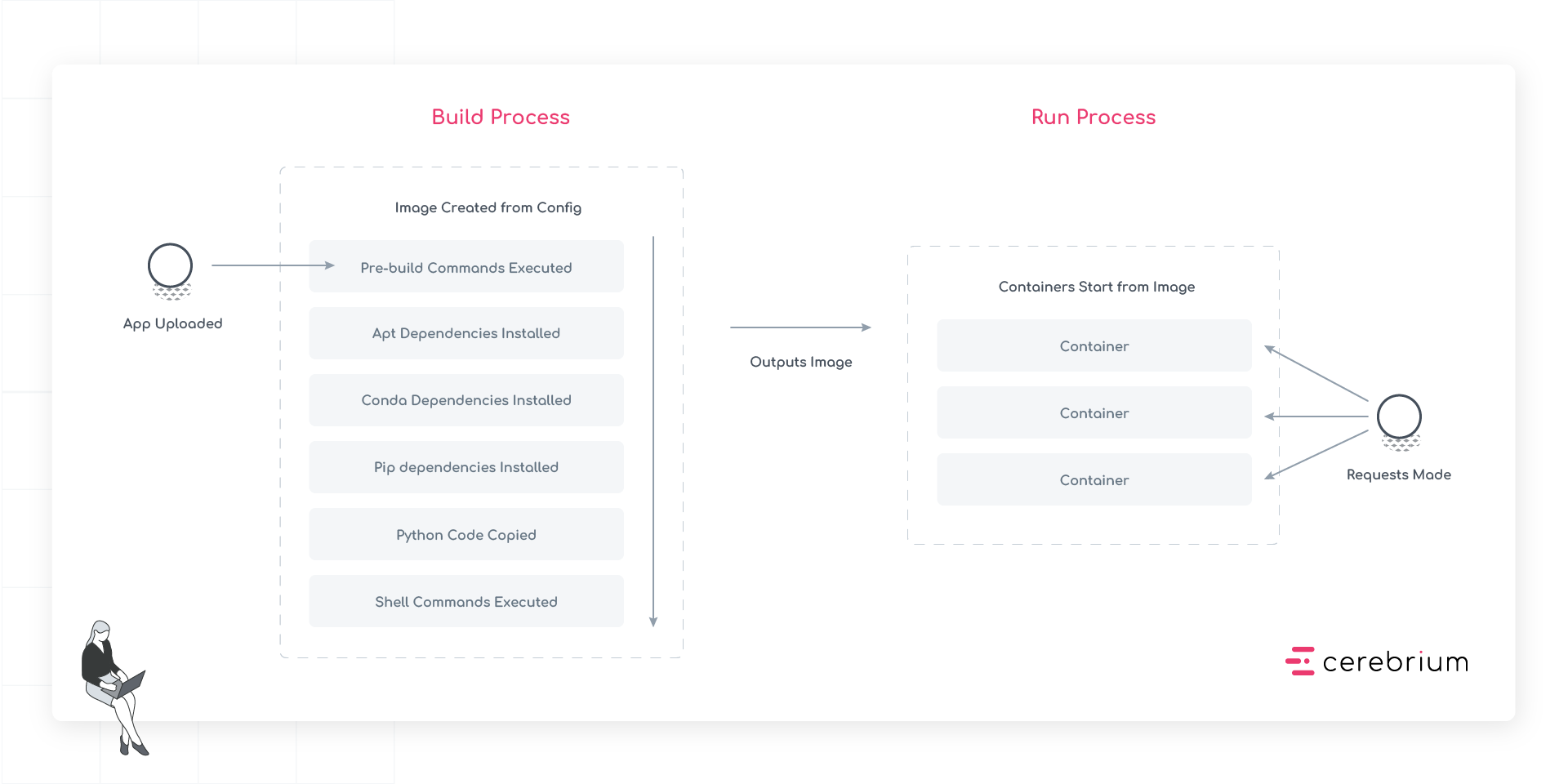
Stage 1: App Upload
Code is uploaded to Cerebrium, including all source files, configuration, and additional assets needed for the app.Stage 2: Image Creation
The system creates a container image through the following sequential steps:- Pre-build Commands Execute: First, any pre-build commands run. These set up the build environment and compile necessary assets before the main installation steps begin.
- APT Dependencies Install: System-level packages install next, establishing the foundation for all other dependencies.
- Conda Dependencies Install: After APT packages are in place, Conda packages install.
- Pip Dependencies Install: Python packages install last, ensuring they have access to all necessary system libraries and binaries.
- Python Code Copy: The app’s source code copies into the container, placing it in the correct directory structure.
- Shell Commands Execute: Finally, any build-time shell commands run to complete the image setup.